

Project 2: Interactive Machine Learning Predictions with LLM Integration
ML Model Creation and Storage
The first phase focuses on building the ML model and preparing it for integration. As a template the structure of Project 1 was used and adjusted according to the new requirements. Key steps include:
- Loading and validating the CSV file to ensure data integrity, including checks for empty files, insufficient columns, and missing values in the target class.
- Splitting the dataset into features and target (X and y) while encoding categorical values and storing label mappings for easy interpretation of results.
- Allowing user-defined adjustments for critical parameters of the Decision Tree algorithm such as tree depth, minimum samples per split, minimum samples to be at leafe node and test data ratio via command line (CLI).
- Generating a JSON template to document the structure of the input features for future reuse and model integration.
- Training a Decision Tree model on the processed data and evaluating its performance using accuracy and classification reports.
- Saving essential outputs including the trained model, label encoders, class mappings, model parameters, and feature template for reuse.
- Visualizing the Decision Tree structure and saving it as a PNG image for better interpretability and documentation purposes.
The data used was obtained from the UCI archive (UC Irvine Machine Learning Repository). To build the model, I used the Iris Dataset as it provides a small but accurate data sample with 4 features and one class, making test runs fast and easy to control. While also making the ML model itself easier to understand.
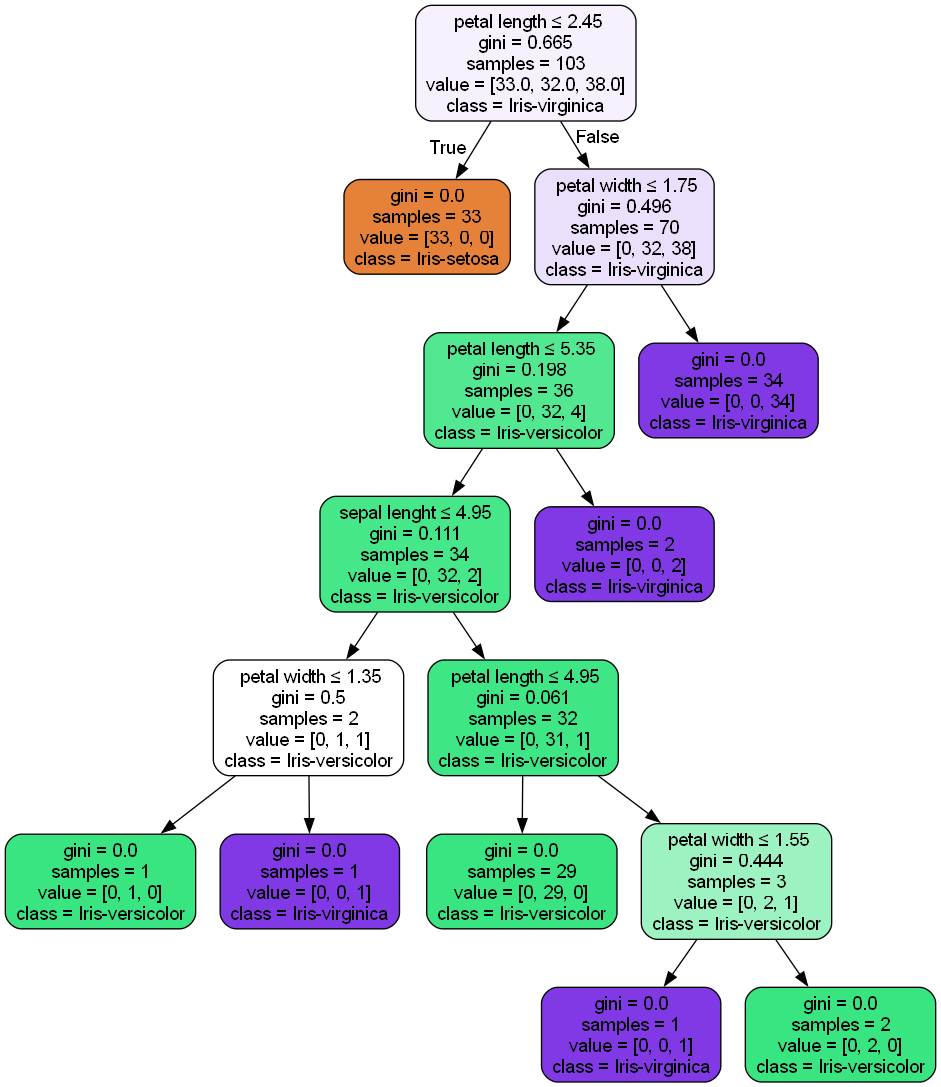 Download Data Model Visualization
import pandas as pd
from sklearn.model_selection import train_test_split
from sklearn.tree import DecisionTreeClassifier, export_graphviz
from sklearn.metrics import accuracy_score, classification_report
from sklearn.preprocessing import LabelEncoder
import joblib
import sys
import graphviz
import os
import json

#set default values for file and class
default_csv_file = "data/learnAndTrain.csv"
default_class_column = "class"
random_state_default = 1234
min_samples_leaf_default = 1
min_samples_split_default = 2
max_depth_default = None
test_size_default = 0.3
output_image_folder = "modelImages"

#get CSV file name by user with default option
csv_file = input(f"Enter name of CSV data source (default: {default_csv_file}): ").strip()
csv_file = csv_file if csv_file else default_csv_file

#load file and include error handling
try:
	data = pd.read_csv(csv_file)
except FileNotFoundError:
	print("\nError: File not found. Please check the file name and path.")
	#exit with sys error - this is part of the sys library
	sys.exit(1)

#validate csv if empty print error
if data.empty:
	print("\nError: The provided CSV file is empty. Please provide a valid file with data.")
	sys.exit(1)

#validate csv if not at least 2 columns print error
if len(data.columns) < 2:
	print("\nError: The CSV file must contain at least two columns (features and class column).")
	sys.exit(1)

#validate csv if all null or invalid data print error
if data.isnull().all().all():
	print("\nError: The CSV file contains only null or invalid data. Please provide a valid file.")
	sys.exit(1)

#get class input from user
class_column = input(f"Please provide the name of the column containing the class (default: {default_class_column}): ").strip()
class_column = class_column if class_column else default_class_column

#drop all rows where the class is missing
if data[class_column].isnull().any():
	data = data.dropna(subset=[class_column])
	print(f"\nWarning: Missing values detected in the '{class_column}' column. Rows with missing values have been dropped.")

#check if data still contain entries after dropping rows
if data.empty:
	print("\nError: All rows have been dropped due to missing values in the class column. Please provide a valid file.")
	sys.exit(1)

#split features and class into x and y
label_encoders = {}
class_label_mapping = {}

for column in data.columns:
	if data[column].dtype == 'object':
		le = LabelEncoder()
		data[column] = le.fit_transform(data[column])
		label_encoders[column] = le
		if column == class_column:
			#this part stores the class label if the column is called class in the file
			class_label_mapping = dict(zip(le.classes_, le.transform(le.classes_)))

X = data.drop(class_column, axis=1)
y = data[class_column]

#define a function to create a JSON template
def create_json_template(features, output_file="model/feature_template.json"):
	template = {"features": list(features)}
	os.makedirs(os.path.dirname(output_file), exist_ok=True)
	with open(output_file, 'w') as json_file:
		json.dump(template, json_file, indent=4)
	print(f"\nFeature template JSON created at {output_file}")

#create JSON template for features
create_json_template(X.columns)

#ask for parameters
max_depth = input(f"Maximum depth of the tree (default={max_depth_default}): ").strip()
min_samples_split = input(f"Minimum samples required to split an internal node (default={min_samples_split_default}): ").strip()
min_samples_leaf = input(f"Minimum samples required to be at a leaf node (default={min_samples_leaf_default}): ").strip()
random_state = input(f"Provide a random state seed (default={random_state_default}): ").strip()
random_state = int(random_state) if random_state else random_state_default
test_size = input(f"Provide test size (must be a float between 0.0 and 1.0, default={test_size_default}): ").strip()
test_size = float(test_size) if test_size else test_size_default

#convert parameters to appropriate types or use defaults
params = {
	#maximum depth of the tree. Controls how many splits can be made down any branch.
	"max_depth": int(max_depth) if max_depth else max_depth_default,
	#minimum number of samples required to split an internal node.
	"min_samples_split": int(min_samples_split) if min_samples_split else min_samples_split_default,
	#minimum number of samples required to be at a leaf node.
	"min_samples_leaf": int(min_samples_leaf) if min_samples_leaf else min_samples_leaf_default,
	#seed for random number generation to ensure reproducibility of results.
	"random_state": random_state
}

#split data for model training and validation
X_train, X_test, y_train, y_test = train_test_split(X, y, test_size=test_size, random_state=random_state)

#train the randomForestClassifier with parameters from user
dt_model = DecisionTreeClassifier(**params)
dt_model.fit(X_train, y_train)

#check the model against the test data in X_test
y_pred = dt_model.predict(X_test)

#get the accuracy score by comparing the y_pred which is the prediction to the labels of the test data y_test
accuracy = accuracy_score(y_test, y_pred)
print(f"Random Forest Accuracy: {accuracy}")

if class_label_mapping:
	print("\nClass Label Mapping:")
	print(pd.DataFrame(list(class_label_mapping.items()), columns=["Original Label", "Assigned Number"]))

#create model classification overview
print("\nClassification Report:\n", classification_report(y_test, y_pred))

#store the model, label encoder and class mapping
os.makedirs("model", exist_ok=True)
joblib.dump(dt_model, 'model/dt_trained_model.pkl')
joblib.dump(label_encoders, 'model/dt_label_encoders.pkl')
joblib.dump(class_label_mapping, 'model/dt_class_labels.pkl')
joblib.dump(params, 'model/dt_parameters.pkl')

#export and save DT image
dot_data = export_graphviz(
	dt_model,
	out_file=None,
	feature_names=X.columns,
	class_names=[str(cls) for cls in class_label_mapping.keys()],
	filled=True,
	rounded=True,
	special_characters=True
)

graph = graphviz.Source(dot_data)
output_path = os.path.join(output_image_folder, "decision_tree")
graph.render(output_path, format='png', cleanup=True)

#confirm completion of process
print(f"\nModel parameters used: {params}")
print("Model, encoders, visualization, class label mapping and parameters have been saved.")