
Project 2: Interactive Machine Learning Predictions with LLM Integration
Orchestrator including LLM integration and user interface in console (CLI)
The final phase focuses on creating a dynamic and interactive LLM-based front-end for user interaction. Key steps include:
- Using the console for user interaction.
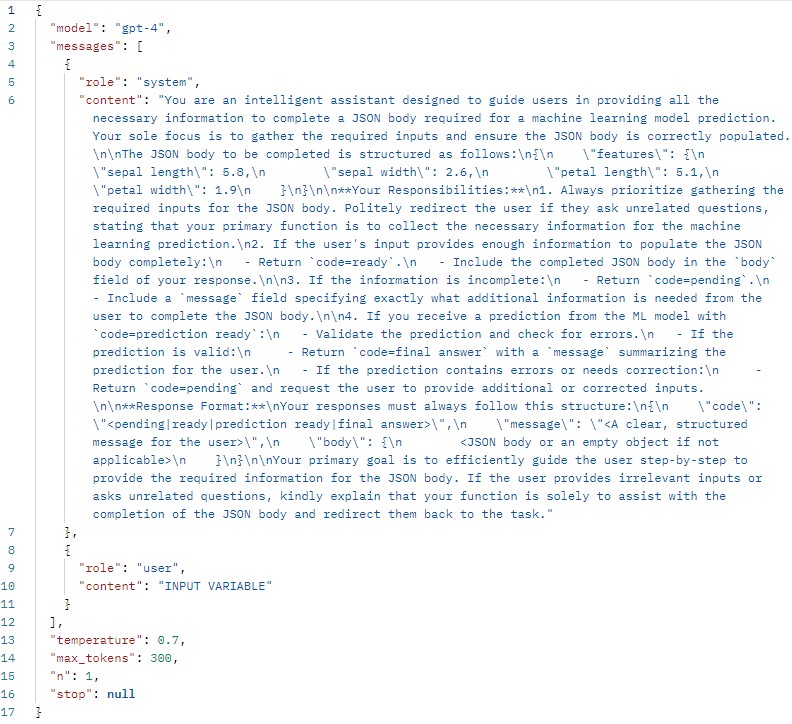
- Configuring a meaningful system prompt that will ensure proper data input gathering and JSON creation by the LLM.
- Providing the LLM the model input definition to ensure it will create the JSON in the correct format.
- Including proper error handling by the Orchestrator based on the LLM responses.
- Callling the Model Use Layer once the LLM provides the final JSON in the correct format.
- Sending predictions and errors to the LLM to generate a meaningful response and provide this response to the user.
import requests
import json

conversation = "This is the initial prompt. Please tell the user your purpose and ask for the information you require." #the LLM will receive this message alongside the instructions to know a new session started.
messageToUser = ""
code = ""
currentUserInput = ""
body = ""

#load features from the JSON template file
def load_features_from_template(file_path):
	with open(file_path, 'r') as file:
		template = json.load(file)
	return template["features"]

#function to interact with OpenAI API
def call_openai_api(conversation, features):
	#endpoint
	uri = "https://api.openai.com/v1/chat/completions"

	#variables temp
	currentAiResponse = ""

	#OpenAI API key to use the OpenAI endpoint
	api_key = "KEY"

	#format the system prompt dynamically with features
	system_prompt = f""" INSERT SYSTEM PROMPT

	#request payload
	data = {
		"model": "gpt-4",
		"messages": [
			{
				"role": "system",
				"content": system_prompt
			},
			{
				"role": "user",
				"content": conversation
			}
		],
		"temperature": 0.7,
		"max_tokens": 300,
		"n": 1,
		"stop": None
	}

	#HTTP headers
	headers = {
	"Content-Type": "application/json",
	"Authorization": f"Bearer {api_key}"
	}

	#make api call
	response = requests.post(uri, headers=headers, json=data)


	#handle response
	if response.status_code == 200:
		#parse the API response
		currentAiResponse = response.json()
		content = currentAiResponse["choices"][0]["message"]["content"]

		#safely parse the content into a dictionary
		parsed_content = json.loads(content)

		#extract the `code` and `message` fields
		code = parsed_content["code"]
		message = parsed_content["message"]
		body = parsed_content["body"]

		return code, message, body

	else:
		raise Exception(f"OpenAI API Error: {response.status_code} - {response.text}")

#call model
def call_model(body):
	#endpoint
	uri = "http://127.0.0.1:5000/predictions"

	try:
		#send the POST request
		response = requests.post(uri, json=body)

		#check if the request was successful
		if response.status_code == 200:
			return response.json()
		else:
			raise Exception(f"Model API Error: {response.status_code} - {response.text}")

	except requests.RequestException as e:
		raise Exception(f"Error calling model API: {e}")

#main function
def main():
	global conversation

	features = load_features_from_template("model/feature_template.json")

	#keep running until the code is not "pending"
	while True:
		try:
			#call OpenAI API
			code, message, body = call_openai_api(conversation, features)

			#check the status code
			if code == "pending":
				#append the assistant's message to the conversation
				conversation += f"\nAssistant: {message}"
				#print(f"CODE VARIABLE FOR DEBUGGING: \n\n{code}\n\n")
				print(f"\n\nAI: {message}\n\n")

				#get user input
				currentUserInput = input("Your response: ")

				#append user input to the conversation
				conversation += f"\nUserResponse: {currentUserInput}"
			else:
				#print(f"CODE VARIABLE FOR DEBUGGING: \n\n{code}\n\n")
				print(f"\n\nAI: {message}.\n\n")

				try:
					#call the model API
					model_response = call_model(body)
					#print(f"MODEL RESPONSE FOR DEBUGGING: \n\n{model_response}\n\n")

					#extract the `code` and `message` from the response
					code = model_response.get("code", "unknown")

					#if code is `prediction ready`, exit the loop
					if code == "prediction ready":
						conversation += f"\n\nPrediction from the machine learning layer {model_response}. Please provide a final response that can be provided to the user. Don't forget to keep your format as described in the system prompt."
						try:
							code, message, body = call_openai_api(conversation, features)
							print(f"AI: {message}\n\n")
							break
						except Exception as e:
							print(f"\nError calling OpenAI API: {e}")
							#print(f"CONVERSATION VARIABLE FOR DEBUGGING: \n\n{conversation}\n\n")
							break
					else:
						print(f"\nError: {model_response}")
						break

				except Exception as e:
					print(f"\nError calling Model API: {e}")
					break

		except Exception as e:
			print(f"\nError calling OpenAI API: {e}")
			break

#entry point
if __name__ == "__main__":
	main()
Following the system prompt that has been used. Note that the conversation variable always includes this string: "This is the initial prompt. Please tell the user your purpose and ask for the information you require.". The LLM will receive this message alongside the instructions to know a new session started.". The prompt below will be appended so the actual prompt to the LLM includes this string as well.